Monday, 11 June 2012

Meta-programming in Python

Python gives the programmer a plethora of facilities for the meta-programming, for instance the introspection of objects, modules, and such. Moreover, like many other interpreted languages, it allows the execution of generated code.

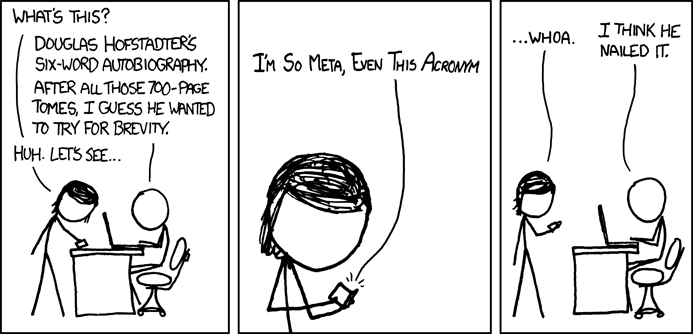
Which is cool, obviously, if you like algorithms that manipulate other algorithmic-generated algorithms.

http://xkcd.com/917/
This is definitively my case, for I need to generate, at run-time, some data structures and methods that shall be given as an input to an ODE integrator. As both things must be visible from the calling module I need to put them into the global namespace. Piece of cake:
exec open(PATH).read() in globals()
where PATH points to the program-generated file that contains the data structures and the functions I need. Again, the elegance and conciseness of Python are astonishing: exec command checks the syntax and interprets the content of the file, after having it read with read() method, and all the variables are kept in globals namespace.

One-liner power!

Thursday, 26 April 2012

Python, my first time

When it comes to learning a new technology I need some starting project that pushes me and gives me "momentum". In particular, it was years that I wanted to learn Python. I touched this language two years ago, at CINECA's SciViz course, and I toyed around with Django, but they have been momentary encounters and I was waiting for some small-sized, not too trivial problem to solve with it.

Recently, a friend of mine was experiencing problems with some visual representations of temporal series, stochastic in nature and very irregular as number of points. The dataset was huge (in the order of gigabytes) therefore an automatic solution was needed.

Probably PERL would have been a better choice, but I have taken the chance and, this morning, in a couple of hours I've completed my first Python project. It took a while to learn the syntax for dictionaries, lambda functions and some useful I/O classes, but the rest was really piece of cake. My final implementation works as follows:
  • a brief preprocessing, in order to determine the length of each temporal series, done with regular expressions and a dictionary;
  • some filtering on the dictionary, in order to remove spurious results;
  • reading the file again while skipping, in every time series, as many rows as are needed to make the time series uniform.
The final code is about 50 rows long (comments included); an equivalent C++ implementation, probably, would have been much longer and complex. For sure, files I/O is much more verbose than the Python's with open(...) as descriptor syntax. 

I'm very far from a serious knowledge of Python's potential, but I'm impressed: the learning curve is astonishing, as is the clarity of the source code. I'm pretty sure that my future implementations that will not require some low-level functionality (eg., CUDA) or extreme performances will be Python-based.

Monday, 2 April 2012

From Protein Data Bank to... Blender!


Visual Molecular Dynamics (VMD) is a stunning piece of software. Not only it is a powerful tool for molecules visualization and rendering, but it is very useful tool for converting PDB structures into other formats that 3D modeling programs can read. In particular, VMD exports into OBJ, which probably is the most common interchange format.

Moreover, it is usable! A+

Wednesday, 21 March 2012

DNA and fractals

DNA is a very interesting molecule, not only for its peculiar role in life. It has a solid structure and the Watson-Crick complementarity allows the construction of complex structures, by exploiting the so called sticky ends, that is, non-paired single strands that urges to be coupled with their complementary ones. 
So, if we manipulate some DNA and give it a regular shape, we can "connect" multiple pieces like a nano-puzzle. Actually, we don't do anything as the DNA makes a self-annealing and spontaneously builds nano-structures, according to the shapes we defined and a starting seed, that is, an initial DNA sequence. More precisely, the process is driven by the encoding of the sticky ends, that decides which shapes can link to each other and how. 
It is very easy to develop a simulator, so tonight I did my own. As a test, I used the "pieces" and the seed that make the DNA construct a Sierpinsky fractal.  

My simulation of DNA self-assembly, using Sierpinsky tile set

I implemented it in a couple of hours, so my simulation algorithm is largely inefficient. For instance, it makes a "scanline" testing of all cells at each iteration, instead of keeping track of the free sticky ends in the assembly.   This means that the complexity grows with lattice's size and with the number of different pieces, too much for testing serious scenarios. Furthermore, it's a strategy that makes the whole process strictly deterministic, introducing a "bias" in the annealing process which proceeds in a very regular way (from bottom to top, from left to right). In order to reproduce all the various mistakes that can happen in the annealing process, a stochastic algorithm should be employed.
By the way, the result is interesting and fascinating. The overall technique resembles the cellular automata, in particular the fact that local rules lead to emergent phenomena, complex and unpredictable.

Monday, 19 March 2012

Using Nsight with a GTX 590

Update: Nsight Development Platform, that is, Parallel Nsight v2.2 finally introduces the single-GPU debugging capability. This is good and allows you to skip the following paragraph.

The only way to make serious CUDA debugging is by using Parallel Nsight by NVIDIA, but it has a drawback: it takes two GPUs. So, you can remotely connect to a GPU-powered machine or you can do it locally, by installing two NVIDIA video cards on the same host. I chose the latter, and bought a GTX 590, a dual-GPU video card that NVIDIA itself considered "not profitable" and consequently stepped down the deliveries. Two GPUs are needed because one of them actually runs the kernels, whilst the other one "inspects" the memory banks of the former. Because of this, you must explicitly disable the SLI functionality, which makes the two GPU a single one:

Disable SLI by clicking "Disable multi-GPU mode"
So, one GPU is going to run the kernels, and the other one is used to "look inside" the video memory. Because of this architecture, the OS can't use the same GPU that run the kernels, so you must connect your screen on the other one. If you want, you can explicitly choose which GPU to use with the method cudaSetDevice().

Parallel Nsight has another, implicit drawback: it is a Windows-only application. In particular, you are going to need the full version Microsoft Visual Studio (VS Express is not supported). Windows has a functionality named timeout detection and recovery (TDR) that automatically determines if something is wrong with the video card driver and resets it. As the debug activity basically halts the execution of the kernels, TDR must be disabled:

Disable TDR by setting WDDM TDR enabled to "false"
Microsoft created some time ago a framework for the creation of nice GUIs in the Windows environment: the Windows Presentation Foundation (WPF). Naturally, they mess up with Nsight, so you have to turn WPF off. It can be done by looking for the DisableWpfHardwareAcceleration.reg file in the "common" directory of Parallel Nsight ("C:\Program Files\NVIDIA Parallel Nsight 1.51\Common" on 32-bit architectures, and "C:\Program Files (x86)\NVIDIA Parallel Nsight 1.51\Common" on 64-bit architectures). Double click on the file to install it.

WPF is not the only thing that breaks Nsight's work: the Aero interface does not allow debugging too. You can disable Aero it by setting a non-Aero theme:


Are we done? Not yet! Remember to open the Parallel Nsight Monitor before debugging your kernels. Moreover, if you try compiling a kernel in Visual Studio and debugging it, you could receive a message that basically says that Nsight can't find your executable. You have to explicitly tell where your compiled files are: 

Fill the "Working directory" field with the absolute path to your compiled file.
Now you can enjoy the CUDA debugging features of Parallel Nsight! Yikes!